How to Test Your Resume for ATS (Free Methods)
 Ayush Panthri | Published: | Updated: | Reviewed By
  Kunal Saxena
Many job seekers apply to dozens of roles but get few or no interview calls. One major reason is simple: their resume is not optimized for Applicant Tracking System (ATS) .
Most companies use ATS software to scan, filter, and rank resumes before a recruiter even sees them. If your resume is not ATS-friendly, may never reach human eyes.
The good news? You can test your resume for ATS compatibility for free and fix issues before applying.
In this ATS score guide, you’ll learn exactly how to check your resume, improve it, and increase your chances of getting shortlisted.
By end of this you”ll know
Methods of Testing your Resume for free:
Testing your resume for ATS doesn’t require expensive tools. You can start with manual methods and then validate your results using free ATS checker tools.
This combined approach gives you a more accurate understanding of how your resume performs.
Method 1: Manual Methods (No Tool)
Manual testing is one of the most reliable ways to check ATS compatibility because it focuses on real job relevance, not just scores.
Step 1: Checking your Text
Paste your resume into Notepad and check if your text is clear and readable. If it is, ATS systems can likely parse it correctly, increasing your chances of getting shortlisted.
Step 2: Check Resume Formatting
Ensure your resume is ATS-friendly:
- Proper spacing between sections
- Same font and size everywhere
- Keep layout simple
Step 3: Copy the Job Description
Find a job you want to apply for and copy the full job description in Notepad and identify important Keywords.
Scan the job description and highlight:
- Skills (e.g., Excel, Python, SEO)
- Tools (e.g., Salesforce, Tableau)
- Responsibilities (e.g., reporting, project management)
Focus on keywords that appear multiple times.
Match the language
Use similar wording from the job description
- Job description: “Data Analysis”
- Your resume: “Analyzed datasets”
Step 4: Compare With Your Resume
Open your resume and check:
- Which keywords are already included
- Which important ones are missing
This step shows your keyword Matching.
Method 2: ATS Resume Checker Tool
An ATS Resume Checker Tool tests your resume the way hiring systems do.
The tool scans your resume and compares it with a job description.
Manual methods take more time and effort, while ATS tools quickly check resumes for keywords and formatting.
How ATS Resume Checkers Work
ATS resume checkers are tools designed to simulate how an Application Tracking System (ATS) scans and evaluates your resume. They don’t just read your resume like a human they break it down into data, compare it with job requirements, and generate a match score.
Understanding how these tools work helps you optimize your resume in a smarter, more targeted way.
Resume Parsing and Data Extraction
ATS tools don’t view your resume visually they parse it into structured data.
Parsing means:
- Extracting sections like Name, Skills, Experience
- Reading bullet points and job titles
- Converting your resume into machine-readable format
If your resume uses:
- Complex tables
- Images or icons
- Unusual formatting
The ATS may fail to read it correctly.
This can lead to:
- Missing information
- Misclassified sections
- Lower match scores
Keyword Matching and Relevance
At the core of every ATS checker is keyword matching.
These tools scan your resume and compare it with a job description to identify:
- Matching skills (e.g., Project Management, SEO)
- Missing keywords
- Frequency and placement of important terms
The more relevant keywords you include (naturally), the higher your match score.
However, it’s not just about adding keywords. ATS systems also evaluate:
- Context – Is the keyword used correctly?
- Relevance – Does it match the job role?
- Frequency – Is it mentioned enough times?
ATS Score and Match Percentage
After analyzing keywords and parsing your resume, ATS checkers generate a score or match percentage.
This score typically reflects:
- Keyword match with the job description
- Relevance of experience
- Formatting and readability
- Section completeness
Free Tools to Test ATS Compatibility (My Experience)
To see how consistent ATS resume checkers really are, I uploaded the same resume into a few free tools using the same job description and compared the results.
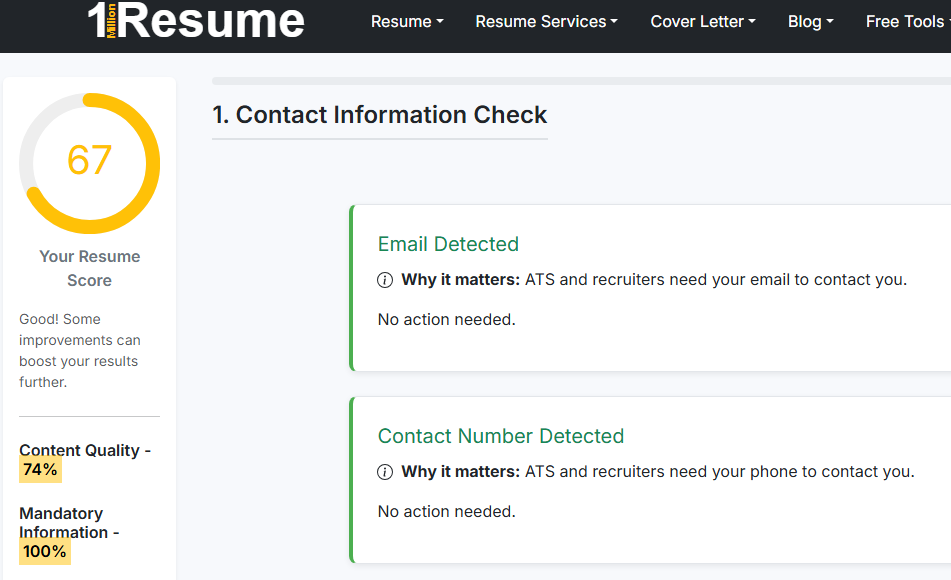
1millionresume
Steps for checking your ATS Resume Score in 1millionresume tool:-
Step 1: Upload Your Resume
Software starts scan to analyze your resume.
The tool will evaluate:
- Mandatory Information
- Quality Content
- Essential Resume Section
- Document Properties
Step 2: Paste the Job Description in skills & keyword targeting section.
Step 3: Check Your ATS Score
Enhancv
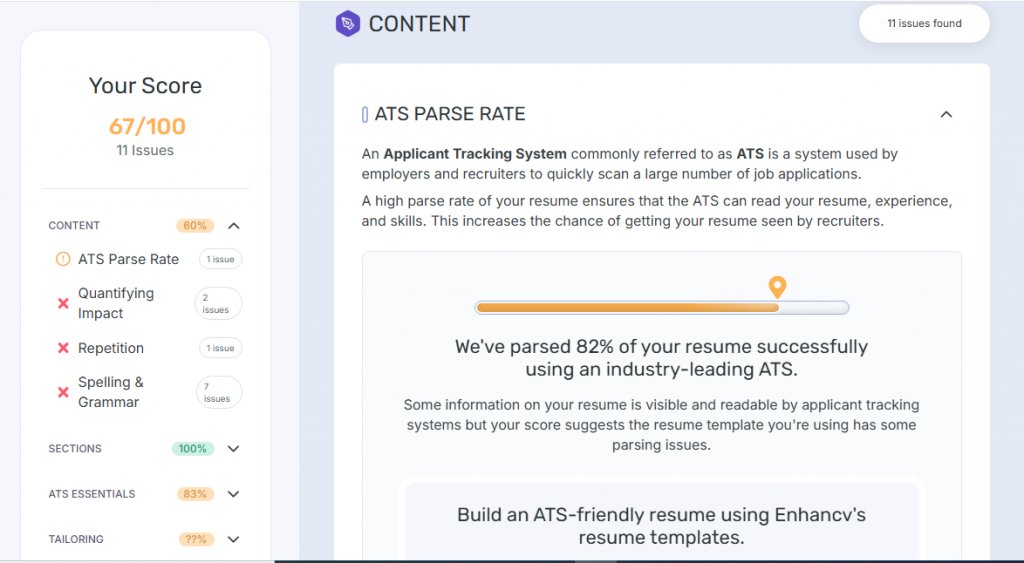
Steps for checking your ATS Resume Score in Enhancv tool:-
Step 1: Upload Your Resume
Software start scan your Resume.
The tool will evaluate:
- Quantify Impact
- Repetition of words
- Design
- Header Links
Step 2: Paste the Job Description in Resume Tailoring section.
Step 3: Review Your Resume Score
Resume Worded
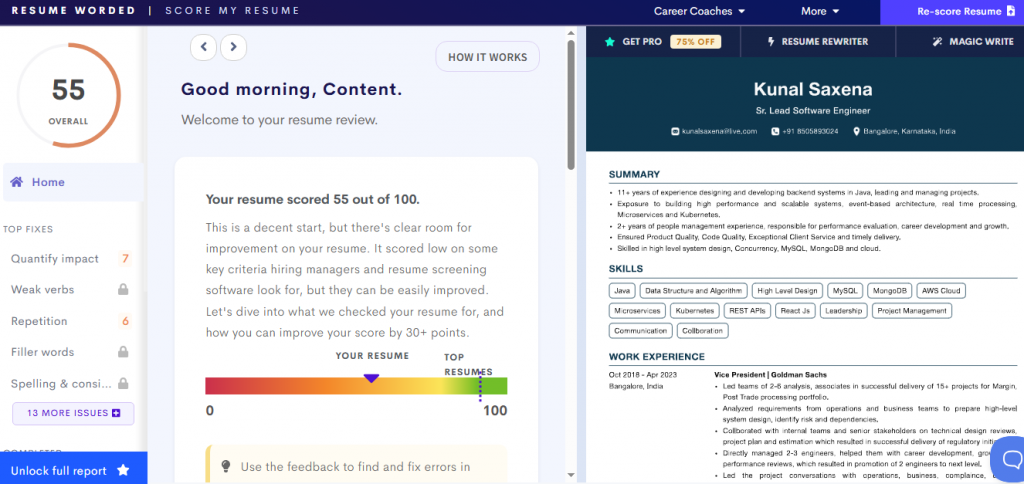
Steps for checking your ATS Resume Score in Resume Worded:-
Step 1: Upload Your Resume
Step: 2 Select one Option
- Entry – Level (Less than 2 year of experience)
- Mid – Level (2 and 10 years of relevant work experience)
- Senior – Level (More than 10 years of relevant work experience)
Step 2: Login to Account
Step 3: Once uploaded, the tool automatically analyzes your resume.
It evaluates:
- Quantify Content
- Weak Verbs
- Spelling & consistency
It shows 13 more checks, but these checks are locked for free users.
Step 4: Check Your Resume Score
Reports of different Resume Checker ATS tools
| Tool | ATS Score | Errors |
|---|---|---|
| 1millionresume | 67% | Grammatical errors, Personal Pronoun Detected, Generic Sentences Detected |
| Enhancv | 67% | Quantify Impact, Repetition of words, Spelling & Grammar |
| Resume Worded | 55% | Weak Action Verbs, Repetition, Repetition of words, Spelling. |
ATS resume checkers are helpful but they are not perfect.
The real goal is not to get an “80%+ score”
The goal is to create a resume that clearly matches the job and is easy for both ATS and recruiters to understand.
You can also visit our best ATS resume checker tool to check your resume for free of cost.
What to Look for in ATS Reports
When you run your resume through an ATS checker, the report provides useful insights. Knowing what to focus on can help you make the right improvements instead of just chasing a score.
1. Keyword Match Score
Check how well your resume matches the keywords from the job description. Look for:
- Missing important keywords
- Partially matched skills
- Overused or irrelevant keywords
2. Missing Skills and Requirements
Most reports highlight skills or qualifications not found in your resume. These are often the main reasons for a low score.
3. Section-wise Feedback
Good ATS reports break down performance by sections like:
- Summary
- Skills
- Experience
- Education
This helps you identify which part of your resume needs improvement.
4. Formatting and Parsing Issues
Look for warnings related to:
- Tables or graphics
- Incorrect headings
- Unreadable sections
These issues can prevent ATS from correctly reading your resume.
5. Bullet Point Quality
Some tools analyze your bullet points and suggest improvements such as:
- Using strong action verbs
- Adding measurable results
- Making points more specific
6. Overall Match vs Job Description
Focus on how well your resume aligns with the actual job role, not just the percentage score. A high score only matters if it reflects real relevance.
How to Improve Your Resume After ATS Testing
Once you’ve tested your resume with an ATS checker, the next step is to act on the insights. Instead of only focusing on increasing the ATS score, aim to improve relevance, clarity, and alignment with the job decryption. Testing is only useful if you act on the feedback
1. Fix Missing Keywords
Update your resume for each job by aligning it with the specific requirements and keywords mentioned in that job description. Review the report and add important keywords that are relevant to your experience. Include them naturally in:
- Skills section
- Summary
- Experience or projects
2. Fix Your Resume Using Feedback
Some important feedbacks which helps you to fix your resume:
- Improve Bullet Points – Using action verbs, Adding measurable results where possible, Connecting your work to job requirements
- Fix Formatting Issues – Use simple layout and standard headings, Remove tables, graphics, or complex designs, Keep consistent font and spacing.
- Add a clear skills section – Include a dedicated skills sections with relevant technical and soft skills from the job description.
7. Retest Your Resume
After updating your resume, test it again with an ATS checker. If the score is still low, find and fix the remaining gaps.
Improving your resume after ATS testing involves adding relevant keywords, strengthening content, fixing formatting, and tailoring your resume for each job. Small, targeted changes can significantly improve your chances of getting shortlisted.
Testing is only useful if you act on the feedback.
Limitations of Free ATS Checkers
Free ATS resume checkers can be helpful, but they have several limitations. Relying only on these tools may give you an incomplete or sometimes misleading picture of your resume’s performance.
1. Not the Same as Real ATS Systems
Free tools only simulate ATS behavior. Actual company systems use different algorithms, so the score you see may not reflect real hiring outcomes.
2. Limited Keyword Analysis
Most free tools focus heavily on keyword matching but may not fully evaluate context, relevance, or how well your experience fits the role.
3. Basic or Restricted Features
Free versions often come with limitations such as:
- Limited number of scans
- Restricted insights or suggestions
- No detailed section-wise analysis
4. Generic Feedback
The suggestions provided are often general and not tailored to your specific industry, experience level, or career goals.
5. Inaccurate Scoring Variations
Different tools can give very different scores for the same resume because each uses its own scoring method.
6. Overemphasis on Score
These tools may encourage you to chase a higher score rather than focus on creating a strong, relevant resume for recruiters.

Conclusion
Improving ATS compatibility is not just about increasing your score it’s about making your resume easy to read, relevant, and aligned with the job description. Here are some final tips to help you get it right.
- Tailor your resume for every application
- Focus on relevance, not just score
- Use keywords from the job description
- Highlight achievements, not just duties
- Keep formatting clean and simple
Testing your resume for ATS is one of the easiest ways to improve your job search results.
Author – Ayush Panthri
Connect on LinkedIn

Reviewer – Kunal Saxena
Kunal is a seasoned Technical Resume Writer with over 13 years of experience working with startups, mid-sized firms, and top global companies like Goldman Sachs and EY. He brings deep domain expertise across tech, education, insurance, e-commerce, and investment banking.
He has helped hundreds of professionals from top firms—including Apple, Meta, Google, Adobe, and Amazon — land interviews and advance their careers globally. His approach blends real-world hiring insight with high-impact resume strategy.
Kunal is an active member of Career Thought Leaders and the Resume Writing Academy, staying current with global resume trends and recruiter expectations.
Connect on LinkedIn